Setting up a scene timelapse
Joys of Vulkan
The biggest question, why did I go with Vulkan as my rendering API?
The smart answer is because I wanted to futureproof my skillset and learn a paradigm that is increasingly becoming the industry standard. But the honest one is that the choice
was made because of a healthy mix of arrogance and spite. Vulkan is known to have a steep learning curve due to it’s complexity and would not be the first choice for most people
deciding to embark on the, already challenging enough, journey of created a custom rendering engine for the first time.
But if I am honest that is exactly why I did it. When learning something I tend to throw myself into the deep end. By forcing myself to learn the arguably harder skill, I
pick up the modern rendering niceties, whilst still learning the engine/rendering basics that would apply when using any rendering API. To be transparent, I wasn’t starting from
scratch either. I had done rendering of a simple triangle in OpenGL prior to my Vulkan journey and had some prior knowledge of the render pipeline, so I wasn’t learning everything
from the beginning.
Another contributing factor to picking Vulkan (although a little unsubstantiated at the time) was my desire to create and working with path tracing as opposed to a “normal” rasterisation
pipeline. I felt using the modern Vulkan API from the beginning would get me a step closer to achieving my vision.
Deferred Rendering
Right now the engine is rendering lighting using a “Deferred Rendering” setup. In the early stages of the engine lighting was done using a simple forward rendering pipeline. One
that I will admit I ripped straight from the tutorial series I was following when learning Vulkan. When I started implementing deferred, I then had to pull apart and properly
understand areas of the code which I had largely taken from other sources. This exercise proved to me sometimes, you just need to get something in the project so you can move forward,
so long as you accept that the work still needs to be put in later, more often than not rebuilding from the ground up.
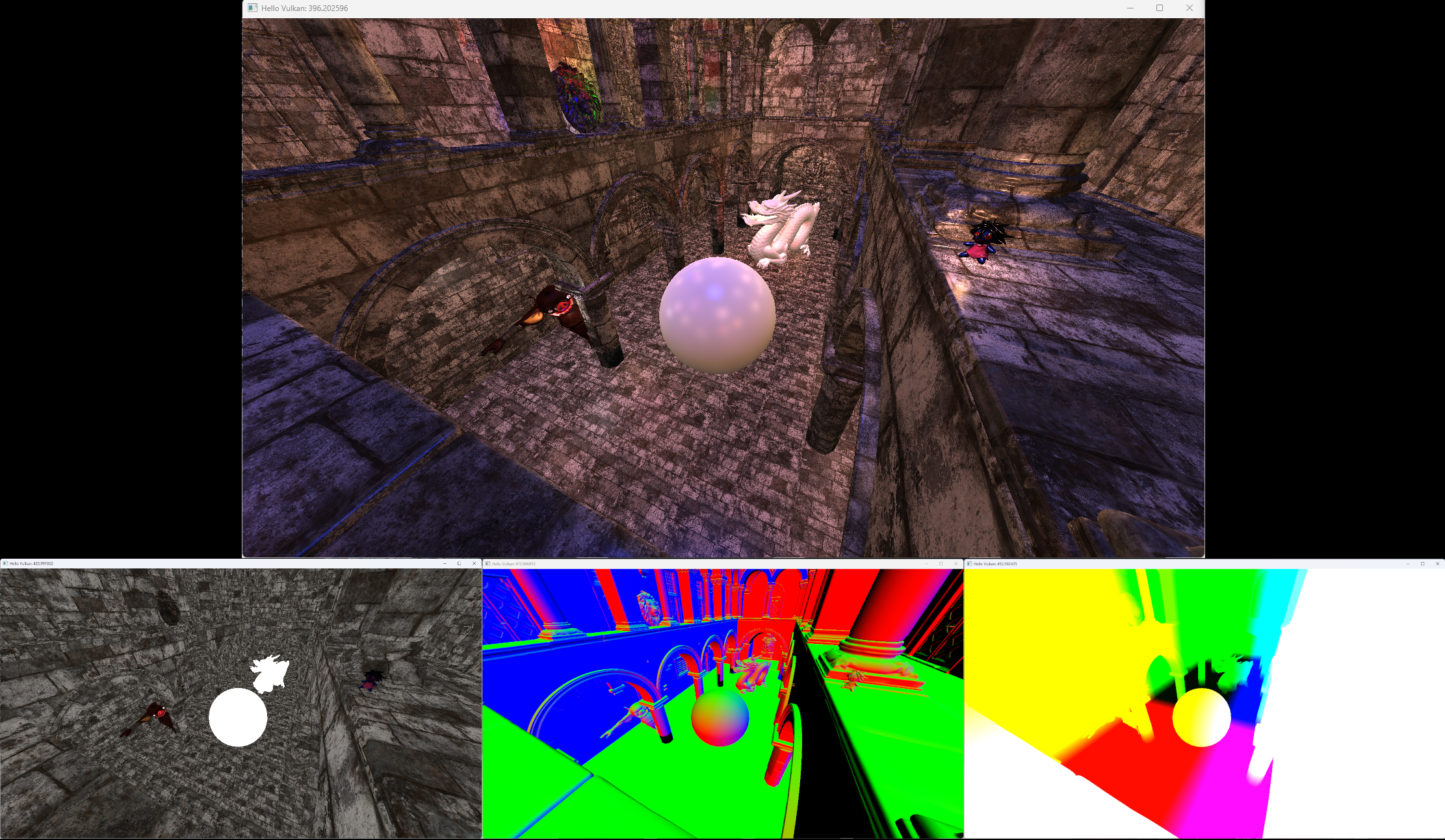 A breakdown of the G-Buffer and final composed image
Mesh Loading
The mesh loading system is currently the only system running on a seperate thread. Mostly utilised during start up it ensures that mesh information is ready for use by
gameobjects. Then during runtime of the engine, new gameobjects (or even existing gameobjects) when requesting meshes from the asset management system, first check if a mesh
is already loaded, and send a request to the mesh loading system on the seperate thread if it doesn’t already exist.
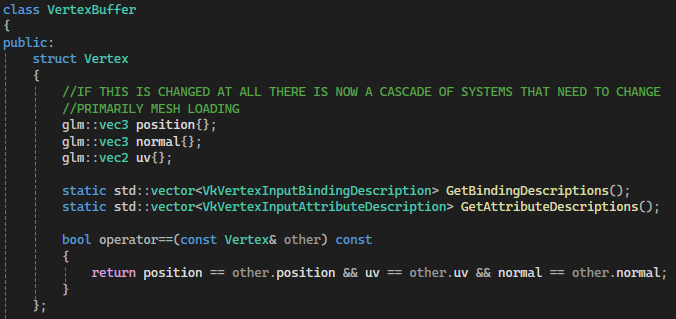 Vertex Struct
 This is the struct defining the vertex information used by every system to store, read and interpret vetex information within the engine. Nothing special but the format
is vital for the meshloading system to serialise and create binary file representations of mesh data. It is also important that Vulkan knows the vertex layout,
the two helper functions in the struct are used by Vulkan to define the vertex information in the pipeline.
Right now my engine only supports the importing of OBJ files, something which I wrote myself and works on a very basic level. An issue I noticed fairly early in using objs
as my mesh data type is that the reading of them is fairly slow. So I created a custom binary file type to store my vertex data, called .kmsh. When the engine is opened the Mesh Loading
thread scans the assets folder for any .obj filetypes and checks if a corresponding .kmsh file exists. If it can’t find a corresponding .kmsh file, it queues the generation
of a new .kmsh file for that model. Whenever loading a model, the engine checks for and loads these .kmsh files. This gives a significant increase in mesh load times.
Below is a excerpt from the logs on engine startup demonstrating the performance difference of loadinf from OBJ and .KMSH. This is using the three largest models
I have in my engine asset folder currently.
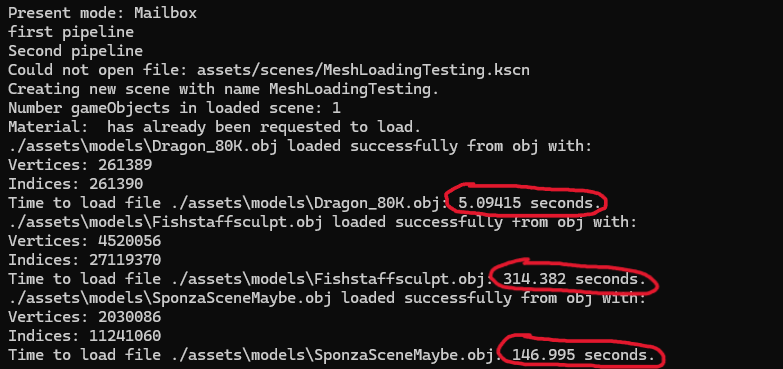 Logs displaying loading times of meshes from .obj type
Seen above is the times printed when loading meshes from an .obj filetype. Even though they are quite large models, over 300 seconds is a long time to be waiting for a
mesh to load, even if it doesn’t affect engine usage as it is loaded on a separate thread.
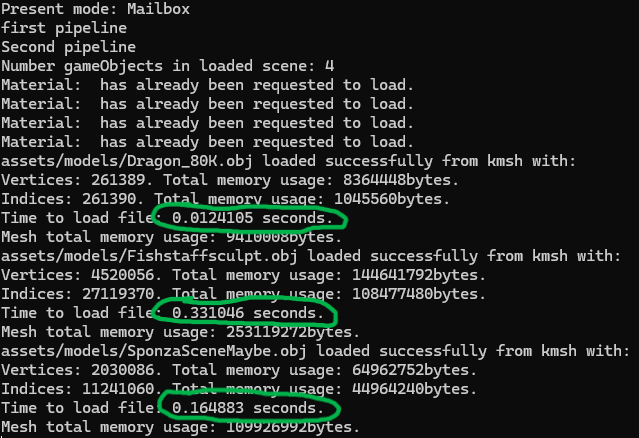 Logs displaying loading times of meshes from .kmesh type
There is a HUGE performance benefit loading large files using binary file type. In the most extreme case it was nearly 100x faster to load the sculpt.
There are some caveats here. Namely that this same performance benefit is not as large when loading smaller files. Files less than 10k vertices only had marginal
performance boost. This times are also taken from the engine running in a “Debug” configuration, in “Release” the obj loading is dramatically improved whilst the .kmsh
times stay relatively the same. Both implementations - loading the .obj files and loading .kmsh files - are relatively naive implementations and could both be optimised
further, but the point regarding the benefit of using .kmsh stays the same, but perhaps with some work won’t have as pronounced a difference.